The Hidden Data in Documents People Send You
Quick answer: Office documents carry a hidden record of their own making. A Word file stores the author, the last person to save it, a revision count, the total editing time, and often the company name and internal comments, all readable by unzipping the file. PDFs store author and producer software. And the biggest leak of all is fake redaction: a black rectangle painted over sensitive text in a PDF is just paint, and the text underneath copies out cleanly. Real redaction removes the text; drawing a box does not.
A finished document feels like a clean surface. You read the words, you see the layout, and that appears to be all there is. It is not. The file has been keeping notes on itself the entire time it was being written, and most of those notes ship with it.
None of what follows is an attack. Every technique here reads a file that was handed over voluntarily, using tools that come with the operating system or are a free download. The information was already in the document. Someone simply never looked.
A .docx is a zip file
Start with the fact that unlocks the rest: a modern Word document is not a single blob. It is a ZIP archive with a different extension. Rename `report.docx` to `report.zip`, open it, and you are looking at a folder of XML files. One of them, `docProps/core.xml`, is the document's own record of who touched it.
Here is that record, pulled from a file without opening Word at all:
=== a .docx is just a zip; read docProps/core.xml ===
  files inside: [Content_Types].xml, _rels/.rels, docProps/core.xml,
                docProps/app.xml, word/document.xml, ...

  dc:creator         : j.harmon
  cp:lastModifiedBy  : legal-review2
  cp:revision        : 7
  cp:category        : Internal - Do Not Distribute
  dc:description     : hold until the Ridgeline deal closes
The names are invented, but the fields are exactly what Word writes. Look at what a single file just disclosed. The original author was one account, the last editor was a different one called `legal-review2`, so the document went through legal. It has been saved seven times. It was tagged internal and not for distribution, and it still went out. And there is a comment in the metadata, never meant for the reader, naming a deal and a hold instruction.
A companion file, `docProps/app.xml`, adds more: the `Company` name baked in from whoever's licensed copy of Office created it, the `Template` it was based on, and `TotalTime`, the number of minutes the document was open for editing. That last one has embarrassed people, because "this contract took four minutes of editing time" and "this was represented as carefully reviewed" do not sit well together.
None of this required software. A zip tool and a text editor read all of it. The point of the demonstration is that there is no lock to pick. The record is sitting in plain XML inside the file you were sent.
The redaction that isn't
Now the big one, the mistake that has burned governments, courts, and law firms over and over.
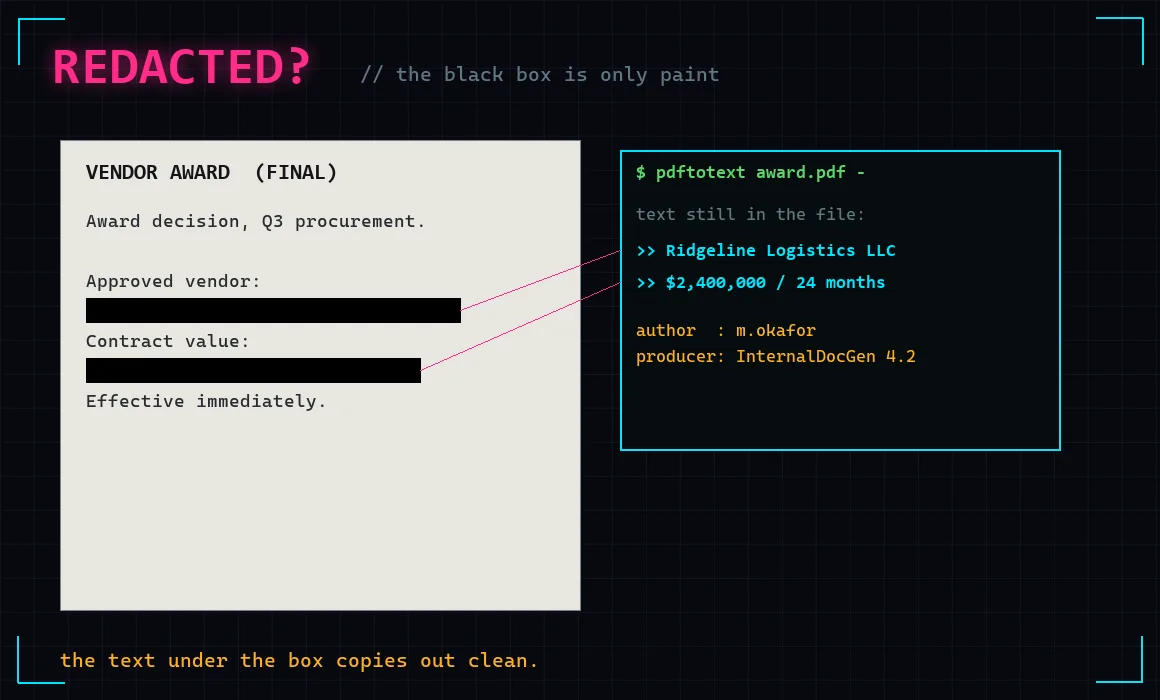
To redact a PDF, someone opens it, draws a black rectangle over the sensitive line, and saves. It looks perfect. The text is gone, visually. Here is what happens when you ask the file, rather than your eyes, what is on the page:
=== PDF 'redaction': black boxes drawn over text ===
  the page LOOKS like: two lines hidden under solid black boxes
  text actually still in the file:
     >> Approved vendor: Ridgeline Logistics LLC
     >> Contract value: $2,400,000 over 24 months
The black boxes are a drawing layer sitting on top. The text layer underneath is completely intact, and extracting it takes one line of code or, more simply, selecting the "hidden" area with the cursor and copying it. A great deal of the time you do not even need a tool: Control-A to select all, paste into a text editor, and the redacted words are right there.
This is not a rare blunder. It is arguably the most common document leak there is, because the mistake looks like success. The person who drew the box saw black over the words and reasonably concluded the words were gone.
When it happened for real
The pattern repeats across every sector that handles sensitive PDFs:
- A US federal court filing in the Paul Manafort case in 2019 was redacted with a method that left the text selectable. Reporters copied the "hidden" passages within minutes of it hitting the docket.
- The TSA published an operating manual online with sensitive screening details redacted by black box; the underlying text was recoverable, and the document had to be pulled.
- Corporate filings, settlement agreements, and government reports have all leaked this way. Search "redaction failure" and it is a genre, not an incident.
The through line is that the people doing it were professionals who believed they had redacted correctly. The tool did what they asked. They asked for a rectangle.
PDFs sign their own maker
While a PDF is open, it is worth reading its document properties too:
=== PDF document metadata ===
  author    : m.okafor
  producer  : InternalDocGen 4.2
  title     : vendor-award-FINAL-v3
The `producer` field names the software that generated the file, which can quietly reveal an internal system nobody meant to name. The `title` here is the internal filename, `vendor-award-FINAL-v3`, not the polished title on the cover page. And the author is an account name. A PDF exported straight from Word inherits the Word author too, so the chain of custody often survives the conversion the exporter assumed would sanitise it.
The mental model that prevents all of this
Every leak above comes from one wrong assumption: that what you see is what the file contains. It is not. A document has a visual layer and a data layer, and they are not the same thing. Covering something visually does nothing to the data. Deleting something from view does not always delete it from the file's history.
Once you hold that idea, the defences are obvious, and they are all built in.
How to actually strip and redact
Word: Inspect Document. Before sending anything, File, Info, "Check for Issues," "Inspect Document." It finds the author, comments, revision history, hidden text, and personal information, and removes them in one pass. This is Microsoft's own tool for exactly this problem and almost nobody runs it.
Turn off tracked changes properly. Accepting all changes is not the same as removing them from history. Run Inspect Document to be sure the revision trail is gone, not just hidden.
PDF, true redaction. Acrobat Pro has a real Redact tool (Tools, Redact) that removes the underlying content, not a box that covers it. The critical step is "Apply," which actually deletes the marked text and images. After applying, run "Sanitize Document" to strip metadata and any leftover hidden data. Free tools exist too, but verify them: redact, save, reopen, and try to select the redacted area. If you can copy it, it is not redacted.
The nuclear option: flatten to an image. If you are unsure of your tools, print the document to PDF as images, or export each page as a flat image and rebuild the PDF from those. An image has no text layer to leak and no metadata history from the editor. You lose selectable text and searchability, which is the cost of certainty. For a one-page sensitive document going to strangers, it is often the right call.
Strip metadata in bulk. The same `exiftool` used for photos reads and clears metadata from PDFs and Office files:
exiftool contract.pdf              # show every metadata field
exiftool -all:all= contract.pdf    # strip metadata (not the redaction problem)
One honest caveat: clearing metadata is not the same as fixing a bad redaction. Metadata scrubbing removes the author and producer fields. It does not remove text hiding under a black box, because that text is page content, not metadata. Those are two separate leaks and they need two separate fixes. Do both.
The wider point
This is the same shape as every other piece in this series. Nobody broke into anything. The document was handed over, and it carried more than its sender saw, because the sender trusted the surface and the surface was not the whole file.
A photo carries the coordinates where it was taken. A public log carries the internal hostnames a company never advertised. A Word file carries the name of everyone who edited it and how long they took. In every case the information was published, not stolen, and the defence is the same: know what your files say about you when you are not looking, and turn the loud parts off before you hit send.
Frequently Asked Questions
How do I remove metadata from a Word document?
Use Word's built-in tool: File, Info, Check for Issues, Inspect Document. Tick the categories and remove them. It clears the author, last-editor, comments, revision history, and hidden text in one pass. For files you did not make in Word, or for PDFs and images, the free `exiftool` reads and strips metadata from the command line. Do this before sharing, not after, because once the file has left your hands the original is out.
Can you really read text under a redaction black box in a PDF?
Very often, yes. If the redaction was done by drawing a filled rectangle over the text, the text remains in the file and copies out by selecting the area or extracting it with a tool. Real redaction removes the underlying content. The quick self-test: after redacting, reopen the file and try to select and copy the blacked-out region. If anything comes out, the text is still there.
What does the revision number in a Word document mean?
It counts how many times the document has been saved, and the `TotalTime` field records the minutes it was open for editing. Neither is a secret exactly, but together they can contradict a claim that a document was carefully reviewed, and the last-editor field can reveal which department or person touched it last. Inspect Document removes all of it.
Is it safe to use an online metadata remover?
Be careful. Many web-based removers upload your file to their server to process it, which means you have sent the sensitive document to a third party in order to clean it. For anything private, use the built-in tools in Word or Acrobat, or `exiftool` locally. They never transmit the file anywhere.