How a Gaming Network Optimizer Works, Layer by Layer
Quick answer: A gaming network optimizer lowers ping by intervening at OSI Layer 3 (the network routing layer), where most variable latency comes from due to BGP routing inefficiency. It reroutes your game traffic across a private overlay network onto a shorter, cleaner path. A VPN cannot do this: it adds encryption overhead at Layer 6 and does not improve Layer 3 routing, so it usually raises ping rather than lowering it. No tool can beat the Layer 1 speed-of-light floor.
The OSI model is the seven-layer reference for how network communication works. It is taught in every networking class, then mostly forgotten until something breaks and someone has to figure out which layer the problem lives at. The "use a VPN to lower your ping" advice fails this same test. The advice ignores which layers latency actually comes from, and the VPN does not operate at the layer where the savings are. A gaming network optimizer does. This article walks through the seven layers, calls out where ping latency originates at each one, and explains exactly which layer the optimizer intervenes at.
I have spent twenty years operating networks at the enterprise scale and a chunk of that as a CCNA holding the certification across multiple cycles. I am not opposed to consumer VPNs. I run two of them. I am writing this as the technical companion to why VPNs do not lower your ping. The earlier article makes the case at the user level. This one makes the case at the protocol level.
The seven layers, fast
For readers who skipped Networking 101 or did not finish it:
- Layer 1: Physical. The wire, the radio waves, the fiber. The actual electrons or photons moving.
- Layer 2: Data Link. Frames between adjacent devices. Ethernet, Wi-Fi 6, MPLS labels at the link level.
- Layer 3: Network. Packets routed across the internet. IP addresses, BGP, the routing decisions that decide which path your traffic takes.
- Layer 4: Transport. TCP and UDP. Reliable in-order delivery (TCP) versus fast and stateless (UDP, which gaming uses).
- Layer 5: Session. Conversation management. Less relevant in the modern internet but still defined.
- Layer 6: Presentation. Encoding, encryption, compression.
- Layer 7: Application. The game client, the game server, the protocol they speak to each other.
Latency accumulates at every layer in different amounts and from different causes. The optimizer can only intervene where it has technical leverage. Most of the layers, it cannot.
Layer 1: Physical. The unbeatable floor.
Latency at L1 is the speed of light in fiber. The number is roughly 200,000 km per second, which is about two-thirds of the speed of light in vacuum because the light bounces along the fiber's core rather than traveling in a straight line. The implication: every 1,000 km of fiber adds 5 ms of one-way latency, or 10 ms round-trip.
New York to Los Angeles is about 4,500 km of cable. Round-trip floor: 45 ms. Tokyo to Frankfurt is about 13,000 km. Round-trip floor: 130 ms. Sydney to anywhere is north of 100 ms minimum. These are physical constants. No VPN, no optimizer, no future technology shrinks them without violating physics.
The optimizer cannot help at L1. Neither can a VPN. Anyone who claims sub-floor latency to a distant server is lying.
Layer 2: Data Link. The household and the ISP edge.
L2 latency is mostly your own home and the first hop to your ISP. Wired Ethernet adds about 0.1 ms. Wi-Fi 5 (802.11ac) adds 1 to 5 ms typical. Wi-Fi 6 and 6E reduce that to under 1 ms in good conditions. Powerline adapters add 5 to 20 ms. A bad Wi-Fi configuration on a 2.4 GHz band crowded by neighbors can add 30+ ms during congestion.
The first leg from your router to your ISP's edge router runs over coax (cable), copper twisted pair (DSL), or fiber (FTTH). Modern fiber adds 1 to 3 ms here. Cable adds 5 to 10 ms. DSL adds 15 to 40 ms.
The optimizer cannot help at L2. The fixes are local: wire your gaming machine, upgrade to Wi-Fi 6E if you must use wireless, switch ISPs from DSL to fiber if available. These are infrastructure changes, not subscription products.
Layer 3: Network. Where the optimizer lives.
L3 is the entire internet routing layer. It is also where most of your variable latency comes from, and the only layer where any service-level intervention is possible.
When your gaming packet leaves your ISP's edge router, it travels through a sequence of routers operated by transit providers (Tata, Cogent, Lumen, NTT, Zayo, GTT, and several others). Each router examines the packet's destination IP, consults its routing table, and forwards to the next router. The routing tables are populated by BGP advertisements and by your transit provider's commercial relationships with other transit providers.
The route your packet takes is not the geographically shortest. It is the route that minimizes the cost-of-transit for whichever network is currently carrying the packet. A US East gamer connecting to a US West game server can have their packet routed via Chicago and Dallas and Phoenix instead of via the more direct northern route, because of how the underlying networks peer.
This is the structural inefficiency. Your packet may travel 6,000 km of cable when 4,000 km of cable would have sufficed. The extra 2,000 km of cable is 10 ms of avoidable round-trip latency. Multiply by congestion at the chosen hops and you get bigger numbers fast.
A gaming network optimizer like GearUP intervenes here. The optimizer maintains its own private overlay network of servers at major peering points. It continuously measures actual latency across its overlay and to common game-server endpoints. When you connect, your traffic enters the overlay at the closest GearUP node, hops through the overlay using the measured-best path, and exits at the GearUP node closest to the game server. The route is rewritten. The cable distance traveled often shrinks. The latency drops by the number of milliseconds the bad route was wasting.
This is overlay routing. Cloudflare's Argo, Microsoft Azure Front Door, AWS Global Accelerator, and dozens of enterprise SD-WAN products do the same thing for B2B traffic. GearUP is the consumer-facing version specialized for game traffic. The technical pattern is identical.
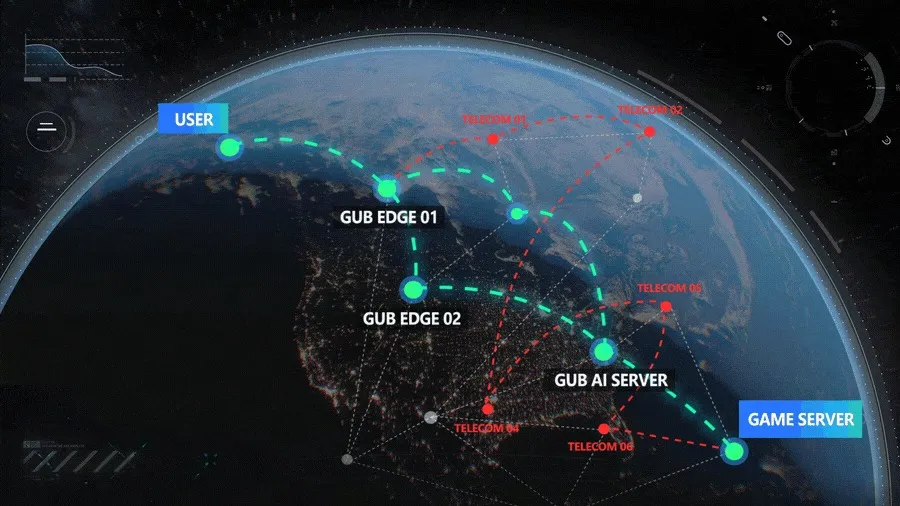
Vendor-supplied diagram of the overlay routing principle.
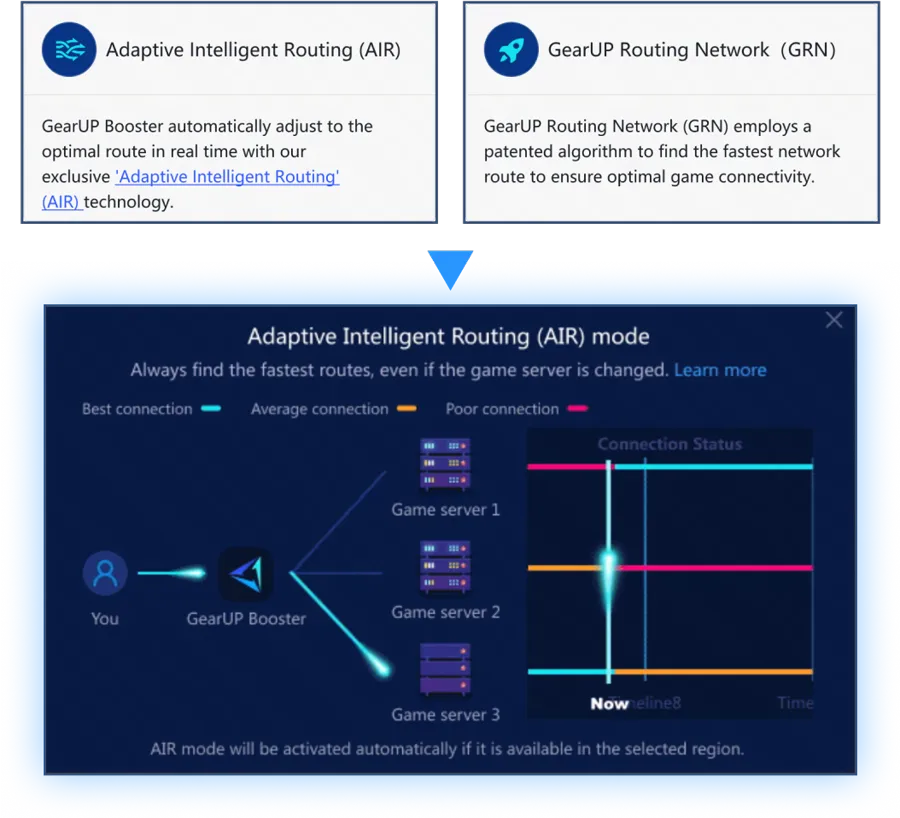
GearUP's Adaptive Intelligent Routing (AIR) is the marketing name for this same overlay routing pattern.
Layer 4: Transport. Why TCP and UDP matter differently.
L4 is TCP versus UDP. Most modern competitive games use UDP because UDP is fast, stateless, and tolerant of packet loss. The game client expects a few packets to drop and compensates client-side. TCP would block on retransmits and produce the rubber-banding most gamers associate with bad ping.
L4 itself does not add much latency. The header is small. The processing is cheap. But L4's interaction with L3 is where the optimizer's value compounds.
If your underlying L3 path drops 2 percent of packets, UDP-based games will hide most of it through interpolation, but the hidden packet loss still introduces visual jitter and occasional teleports. A clean L3 path with 0.1 percent loss feels meaningfully smoother even at the same average ping.
The optimizer's overlay paths are typically cleaner than the default ISP path because the optimizer's servers are sized for traffic the optimizer expects, while the ISP-default path may include congested transit links. The compound effect of better path plus lower loss is what makes the optimizer's improvement feel bigger than the raw ping number suggests.
Layer 5: Session. Mostly skip.
L5 is poorly defined in modern networking and most internet traffic does not really use it. Some protocols (RPC, NetBIOS) had distinct session layers. TCP's connection-management functions blur into L5 in some textbooks. The gaming use case touches L5 only obliquely. There is nothing for an optimizer to intervene at here.
Layer 6: Presentation. Where the VPN's costs live.
L6 is encoding, compression, and encryption. This is where the VPN's overhead lands.
A VPN encrypts every outbound packet (typically with AES-256-GCM or ChaCha20-Poly1305) and decrypts every inbound packet. The CPU cost on modern hardware is small but not zero. The serialization cost of encryption is also small but adds 2 to 8 ms per round-trip on consumer hardware, more on lower-end CPUs without hardware acceleration.
An optimizer typically does not encrypt the game traffic. Some optimizers offer optional encryption as a privacy layer. Most do not, because the goal is latency reduction and encryption adds latency. Game traffic is generally not sensitive enough that the encryption matters; the game's own protocol may already handle authentication and message integrity at L7.
Net at L6: a VPN adds 2 to 8 ms of encryption overhead. An optimizer adds zero or close to zero. This is a small contributor to the overall comparison but it is real.
Layer 7: Application. The game client's role.
L7 is the game itself. The game client typically performs server selection from a list of candidate game servers, often by pinging each candidate and choosing the lowest-latency one. The game client does not know about overlay networks. It just measures latency to each candidate IP and picks the best one.
This matters because of an interaction effect: if the optimizer's overlay improves your latency to one specific server but the game client is looking at multiple candidate servers, the client may still pick a different server based on its own measurements. The optimizer needs to be aware of which game it is running and which servers that game is selecting from.
This is why per-game tuning exists. GearUP for Fortnite handles Epic's regional server clusters specifically. GearUP for Valorant handles Riot's data center routing. GearUP for Escape From Tarkov handles Battlestate Games' notoriously inconsistent matchmaking. The optimizer needs game-specific configuration because the L7 server-selection logic varies by game.
Where each tool actually helps
| Layer | Source of latency | VPN can help? | Optimizer can help? |
|---|---|---|---|
| L1 Physical | Speed of light in fiber | No | No |
| L2 Data Link | Wi-Fi quality, ISP edge | No | No |
| L3 Network | BGP routing inefficiency | No (adds latency) | Yes |
| L4 Transport | Packet loss, jitter | Indirectly | Yes (via L3) |
| L5 Session | Negligible | N/A | N/A |
| L6 Presentation | Encryption overhead | Adds 2-8 ms | Adds nothing |
| L7 Application | Game's server selection | No | Yes (per-game tuning) |
The bottom line for the technical reader
A gaming network optimizer reduces the latency that originates at L3 (BGP routing inefficiency) and improves the L4 packet-loss profile as a side effect of the L3 path quality improvement. Optionally, it tunes the L7 game-client server-selection interaction so the game client picks the right server for the optimizer's overlay path.
A VPN does none of these. A VPN re-routes your traffic through a fixed third-party server for the privacy or geo-unblocking use case, and the encryption at L6 adds latency rather than removing it. The VPN's "ping reduction" use case is a niche edge case where your default ISP path happens to be worse than the VPN's path, and even then the encryption tax usually negates the routing improvement.
The right tool for the ping problem is the tool that operates at L3. That tool is an overlay-routing service. GearUP is the consumer-grade overlay-routing service for game traffic and the one I currently recommend. The free trial is the right way to validate it on your specific connection before committing to a subscription.
For the user-level explanation of the same argument, see why a VPN won't lower your ping. For the privacy and streaming use case where a VPN is genuinely the right tool, see our Surfshark VPN review.
Frequently Asked Questions
Does a VPN lower ping for gaming?
Usually no. A VPN adds AES-256 or ChaCha20 encryption at OSI Layer 6, which costs roughly 2 to 8 ms of round-trip latency on consumer hardware, and it routes you through a fixed server that is not chosen to minimize game latency. It only helps in the narrow case where your ISP's default path happens to be worse than the VPN's path, and even then the encryption tax often cancels the gain. NIST documents the encryption protocols VPNs rely on in SP 800-77 on IPsec VPNs.
What is a gaming network optimizer actually doing?
It operates an overlay network: a private mesh of servers placed at major internet peering points that continuously measures the fastest real path to game servers. Your traffic enters at the nearest node, crosses the measured-best path, and exits near the game server, rewriting the route your ISP would otherwise hand off to transit providers. This is the same overlay-routing pattern used by enterprise products like Cloudflare Argo and AWS Global Accelerator.
Why does my packet take a longer route than the straight-line distance?
Internet routing at Layer 3 is governed by BGP, and BGP picks paths based on the commercial peering relationships between networks, not geographic distance. A US East to US West connection can be routed through Chicago, Dallas, and Phoenix instead of a direct northern path. The extra cable distance becomes avoidable milliseconds. CISA's securing network infrastructure guidance covers how routing and the devices that perform it work.
Why does game ping improvement need per-game tuning?
Game clients pick their own server at Layer 7, usually by pinging a list of candidates and choosing the lowest. An optimizer that improves your path to one server can be ignored if the client still measures and selects a different one. Per-game configuration tells the optimizer which servers a given title selects from, so the overlay path and the client's choice line up.
Can any tool beat the physical latency floor?
No. Layer 1 latency is the speed of light in fiber, about 200,000 km per second. Every 1,000 km of cable adds roughly 10 ms round-trip. New York to Los Angeles has a floor near 45 ms, Sydney to most places is over 100 ms. Anyone claiming sub-floor latency to a distant server is lying.
247plan covers VPN, antivirus, password managers, and network performance tools from a working engineer's perspective. More 247plan guides at https://247plan.net.